Online Safety

Online safety in schools is of paramount importance. As the online world evolves, so do both the online harms and risks facing our children and the relevant legislation, both statutory and non-statutory, which directs and guides how schools should meet their online safety requirements.

School staff and governors play a vital role in setting an example for the whole school and are central to implementing policy and process. It is imperative that a whole school community approach to online safety is adopted and that all stakeholders are aware of their responsibilities
and duties in relation to keeping children safe online. This will support a robust online safety ethos and ensure that schools are providing the best online safety provision they possibly can.

The following pages share information and guidance surrounding online safety. Policies and procedures can be found in the ‘Policy Documents’ section.

  • St Peter at Gowts CE Primary School asserts that online safety is an essential element of safeguarding and duly acknowledges its statutory obligation to ensure that all learners and staff are protected from potential online harm.
  • St Peter at Gowts CE Primary School believes that the internet and associated devices are an integral part of everyday life.
  • St Peter at Gowts CE Primary School affirms that all learners should be empowered to build resilience and to develop strategies to recognise and respond to online risks.

Keeping children safe in education – part one

Lincolnshire Safeguarding Children Board

Every month, the LSCB produces a factsheet on an internet safety area. Monthly newsletters can be located on the ‘Safeguarding in Schools’ tab on the Stay Safe Partnership website.

Advice for parents and carers

KS1 and foundation resources

KS2 resources

Parent Info

Parent Info

Above is a link to the Parent Info website. Parent Info is a collaboration between CEOP and Parent Zone. The website provides high quality information to parents and carers about their children’s wellbeing and resilience.

This service is free and ranges across a wide range of subject matter, from difficult topics about sex, relationships and the internet or body image and peer pressure to broader parenting topics like ‘how much sleep do teenagers need?’

We would like to draw particular attention to the articles section, which may be of use and interest to parents and carers.

Internet Matters

Get expert support and practical tips to help children benefit from connected technology and the internet safely and smartly on the Internet Matters website

Net Aware

New Aware

Net Aware is an online tool that informs parents about the social networks, apps and games that children might be using.

NSPCC

NSPCC

At the above link you will find help and advice for parents regarding how to keep children safe on social networks, apps and games.

Parents and carers can contact the NSPCC helpline whenever they’re worried about a child by calling 0808 800 5000, emailing help@nspcc.org.uk, texting 88858* or contacting us online at nspcc.org.uk/ helpline. The helpline is free, available 24/7 and calls can be made anonymously. NSPCC have joined forces with O2 to provide adults with the skills and tools to help keep children safe online. This helpline provides practical, technical advice including parental controls on electronic devices, adjusting privacy settings, understanding social networks, and information about online gaming. Call the Online Safety Helpline on 0808 800 5002. 

The NSPCC in conjunction with Dan Hawbrook have produced two simple guides on how to handle peer pressure for both young people and teachers/parents.

Peer Pressure for Young People

Peer Pressure NSPCC Tips

EDAN Lincs Domestic Abuse Service

The website for Domestic Abuse support is EDAN Lincs Domestic Abuse Service

Lincolnshire’s Stay Safe Partnership

Lincolnshire’s Stay Safe Partnership has a range of online/e-safety resources available for pupils of all ages including resources for staff to use with pupils, training for staff and resources for parents such as the NSPCC Online Safety Pack for parents and the PACE (Parents Against Child Exploitation) free e-learning and information.

Chief Medical Officer for the UK

The Chief Medical Officer for the UK has published guidance on screen-based activities. The guidance itself has a poster on page 11 which helps parents and carers think about the challenges of managing their children’s screen use. The full guidance and poster can be found here 

Parent and Carer Online Toolkit (Childnet)

The new non-statutory guidance published in the summer, Teaching Online Safety (2019, DfE), recommends that schools ‘Proactively [engage] staff, pupils and parents/carers in school activities that promote the agreed principles of online safety’ (see paragraph 42).

Childnet have updated their parent and carer toolkit that will help parents have conversations about online safety. Their booklet ‘Let’s talk about life online’ includes ten key messages that should be shared with children:

  1. “You can always come to me if you need help.”
  2. “What would you do if this happened…?”
  3. “Remember that not everyone is who they say they are online.”
  4. “Keep your personal information safe, and other people’s too.”
  5. “Be respectful to others online.”
  6. “Think before you post.”
  7. “Remember to ask if it’s okay.”
  8. “Remember not everything is true online.”
  9. “The things other people post online might not always show what their life is really like.”
  10. “Recognise how going online makes you feel and take a break when you need to.”

The Parent and Carer Toolkit can be found here: https://www.childnet.com/parents-and-carers/parent-and-carer-toolkit

Suggested games and game guides from National Online Safety

11-14-Suggested-Apps

7-11-Suggested-Apps

Early-Years-Suggested-Apps

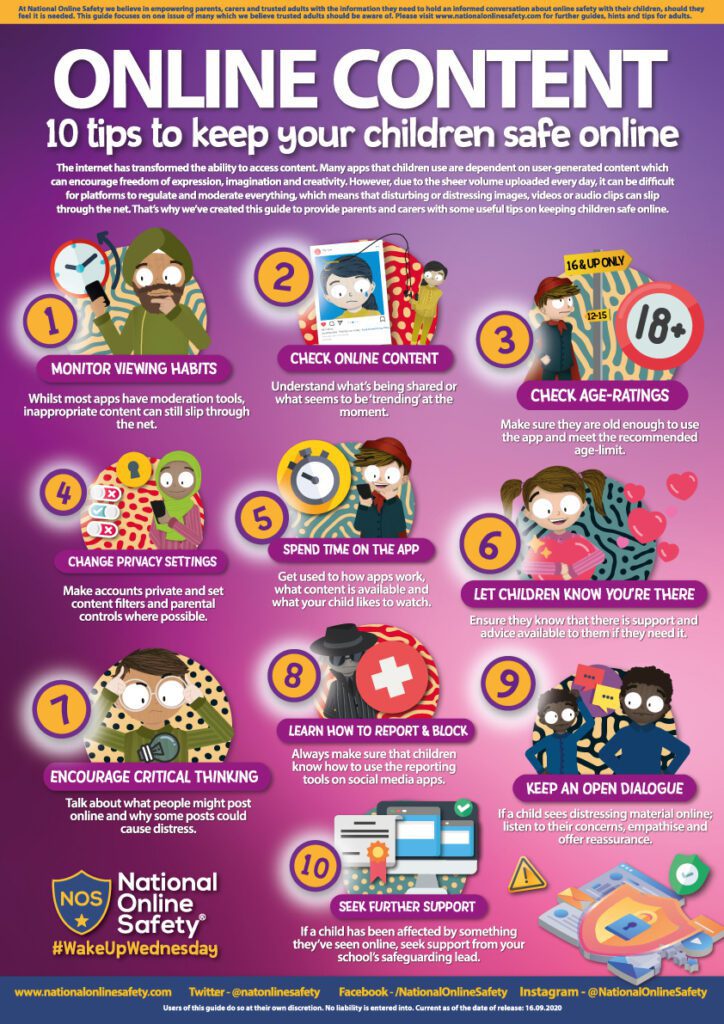
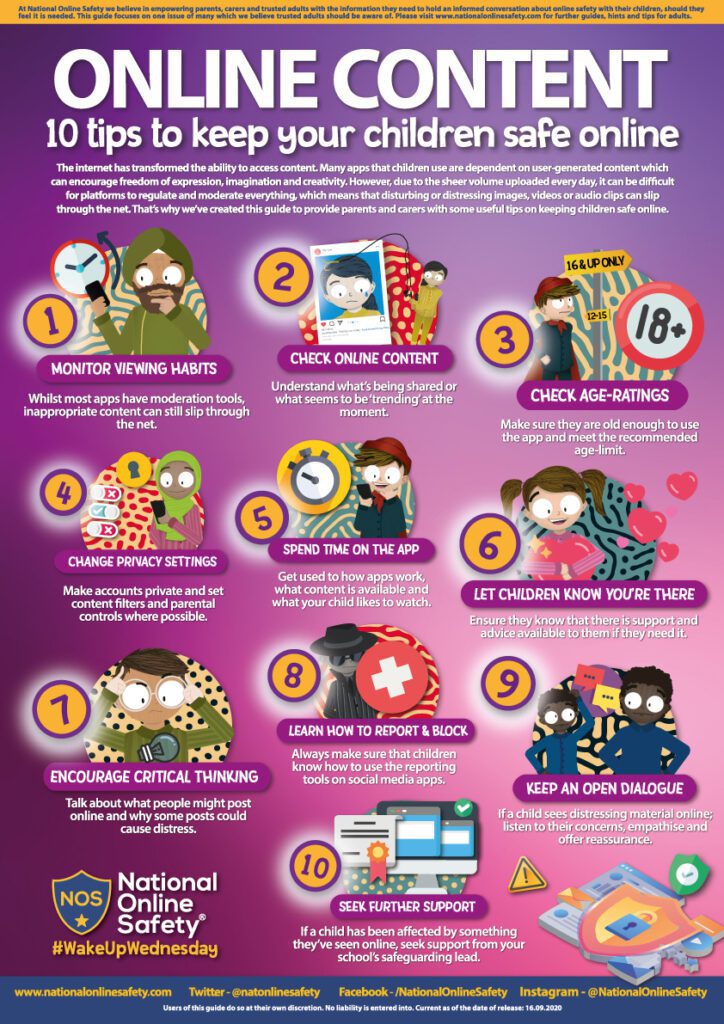
At St Peter at Gowts, we consistently work very hard to protect our pupils online. To show our commitment, we are working with National Online Safety to support teaching and learning in school and also deliver online workshops for all our parents and carers.

We have achieved our National Online Safety Accreditation for the past four years.

In Spring 2021, National Online Safety created a case study about our school, recognising our dedication to digital safeguarding and hard work in achieving not one, but two accreditations: through their respective Certified School and Safe Remote Education programmes. Again in Autumn 2022, our school was featured as a case study to celebrate our continued and effective use of the website and resources.

NOS Online Safety policy September 2022

JOSOs

We are the Josos. JOSOs -Junior Online Safety Officers. As JOSOs, we hope to help children understand how to use the internet safely. We have lots of exciting things planned to support all classes in doing so. We will be talking about trusted adults and being mindful about who you trust on the internet.

As part of our Safer Internet Day celebrations, we held an eSafety poster competition. Children  were asked to create a poster reminding people of important online safety rules.

We used the Safer Internet Day films and Oscar’s Adventures in the Online World eBook to inspire us!

Congratulations to the winners of the eSafety poster competition!

Information for parents and carers

For those who were unable to view the livestream event, you can access the presentation around navigating fake news and protecting ourselves from hackers. By clicking on the link: https://youtu.be/jdceUVjhAwkSome more information for parents and carers:

1) Learn more and get involved – Safer Internet Day 2022

2) Conversation Starters

3) Family Activities

4) Family Online Safety Plan

5) Organisations and Resources for Parents and Carers

Online Bullying – Some top tips

Abusive behaviour online is a common issue for children and young people, and many have come to just accept that this is part of being online. Some will try and laugh it off as harmless ‘banter’ but sometimes it can have a huge impact on the well-being of the person being targeted especially as the person being abusive is known to them.

Here are some of the top tips we share with children and young people in schools which we feel will help them manage abusive behaviour, and what we, as parents and carers, should try to promote.

Don’t Respond

This is one of the hardest things we will ever ask anyone to do and, if we are being honest, it’s difficult for most adults to do. Responding is a natural reaction to this behaviour but it also gives the other person what they want – they will know that their actions have caused upset. Not responding also means that we won’t get reported for posting abusive comments or saying horrible things back.

Save a copy

This is actually pretty straightforward and will work on any app. By pushing or holding a couple of buttons on our device (usual the home/power button and a volume key – just google your device to find out which,) we can permanently save a copy of comments, posts or messages. This means that our children can evidence the abusive behaviour as it will not only show what was written, but also includes the date/time and name of the individual.

Report

All apps and games will give you the ability to report any user who breaks the rules – sometime referred to as community standards or guidelines. If people aren’t acting nicely then you can inform the app that you feel their behaviour is not acceptable and the app will take action. Reporting is anonymous so they won’t know who has reported them and most reports are viewed by a moderator (a real life person) who can then decide whether the rules have been broken and what action to take.

Block

Blocking will stop the user from chatting, messaging, commenting, gaming or accessing their profile. Once that button is pushed, the other users will have no way to communicate with them and is one of the best methods of keeping yourself safe from abusive individuals.

Tell Someone

This is the one bit of advice that children and young people find the most difficult – telling an adult they trust that someone is being abusive towards them online. Many children report being fearful of the consequences of telling an adult – loss of a device or use of an app – for something that isn’t really their fault. It’s perfectly understandable why parents and carers would do this, to remove them from the environment but it also means that children may not always report to them that they are experiencing this abuse and will simple put up with it, having a much greater impact on their well-being. As hard as it can be when your child is involved, teaching them how to manage these individuals can be a better way of keeping them safe while still allowing them to enjoy all the benefits a digital world will bring.

Some of these tips are easier than others but it’s important not to blame our children or remove them from the internet because of somebody else’s behaviour – this can sometimes send the wrong message and make children reluctant to seek help and advice from adults. Childline offers some great advice too about online bullying, including ways we can help someone who is experiencing it. Learn more here

Safer Communities Service – Lincolnshire County Council

Privacy Overview
St Peter at Gowts Church of England Primary School

This website uses cookies so that we can provide you with the best user experience possible. Cookie information is stored in your browser and performs functions such as recognising you when you return to our website and helping our team to understand which sections of the website you find most interesting and useful.

Strictly Necessary Cookies

Strictly Necessary Cookie should be enabled at all times so that we can save your preferences for cookie settings.

Third Party Cookies

This website uses Google Analytics to collect anonymous information such as the number of visitors to the site, and the most popular pages.

Keeping this cookie enabled helps us to improve our website.